In the era of conversational commerce, WhatsApp has evolved from a simple messaging app into a powerful storefront. For small to medium-sized businesses and local retailers, it offers an incredibly direct line to customers. However, as order volumes grow, manually reading messages, checking inventory, logging orders, and sending payment links can quickly become overwhelming.
Enter n8n—a powerful, fair-code workflow automation tool that allows you to connect any app with an API. By combining the widespread reach of the WhatsApp Business API with the flexibility of n8n, businesses can build robust, fully automated order-taking systems without writing thousands of lines of code.
Why Automate WhatsApp Orders?
Before diving into the “how,” it is important to understand the “why.” Manually processing WhatsApp orders creates bottlenecks that can stifle growth:
- Delayed Response Times: Customers expect instant replies in a chat environment. If you are sleeping or busy, a lead can go cold in minutes.
- Human Error: Manually copying order details from a chat into a spreadsheet or e-commerce platform often leads to mistakes in addresses, quantities, or product variants.
- Scalability Limitations: You can only hire so many customer service reps. Automation allows your order capacity to scale infinitely without increasing your overhead linearly.
What You Need to Get Started
To build an automated WhatsApp order system in n8n, you generally need three core components:
- n8n Instance: You can use n8n Cloud for a managed experience or self-host it on your own server (Docker/Node.js) for full data sovereignty.
- WhatsApp Business API: You cannot automate a standard personal WhatsApp account. You need access to the official API, which can be obtained directly through Meta for Developers or via a Business Solution Provider (BSP) like Twilio, MessageBird, or 360dialog.
- Database or E-commerce Backend: A central “source of truth” to store orders and check inventory. This could be Shopify, WooCommerce, Airtable, or even a simple Google Sheet.
Blueprint of a WhatsApp Order Automation
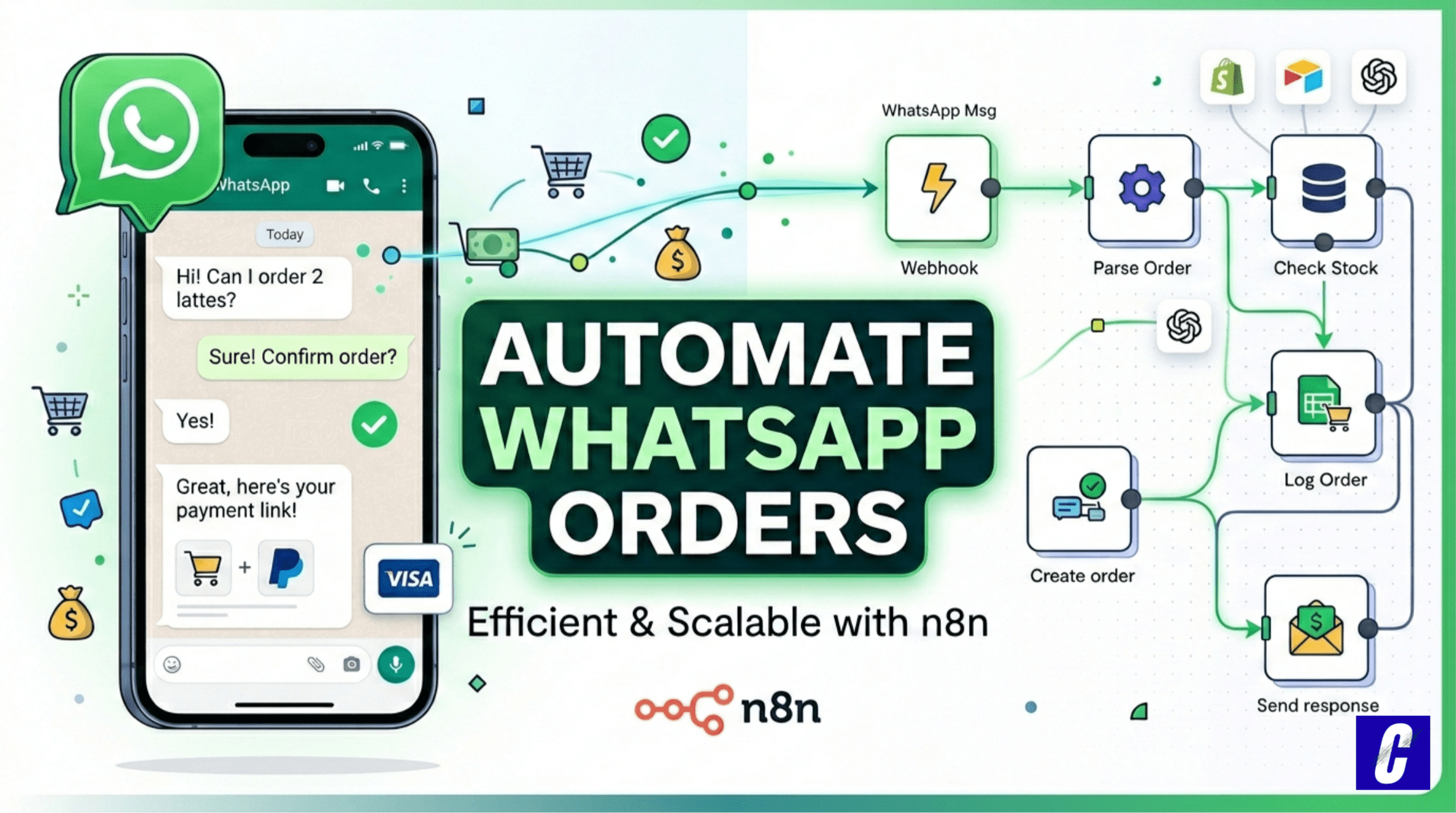
In n8n, workflows are built using “Nodes.” Each node performs a specific action, passing data along to the next in a visual flowchart. Here is what a typical WhatsApp order automation workflow looks like:
1. The Trigger: Receiving the Message
The workflow begins with a Webhook node. When a customer sends a message to your WhatsApp Business number, Meta (or your API provider) sends a JSON payload to your n8n instance containing the sender’s phone number, name, and the message text.
2. Processing the Order Data
Once n8n receives the message, it needs to understand the intent. There are two common approaches:
- Structured Menus: You prompt the customer to reply with specific keywords or numbers (e.g., “Reply 1 for Pizza, 2 for Burger”). n8n uses a Switch node to route the workflow based on the exact value received.
- AI Integration: For a more natural experience, you can route the customer’s text through an OpenAI (GPT-4) or LangChain node within n8n. The AI extracts the product name, quantity, and delivery address from a conversational message and outputs structured data.
3. Inventory and Pricing Check
Before confirming the order, n8n queries your backend. For example, it might use a Shopify node or Airtable node to search for the requested product.
Validation Logic: If the item is out of stock, n8n immediately sends a WhatsApp message back apologizing and offering an alternative. If it’s in stock, the workflow calculates the total price, including taxes and shipping.
4. Creating the Order
If the item is available, n8n creates a new entry in your database. It logs the customer’s phone number, the items ordered, the timestamp, and the initial order status (e.g., “Pending Payment”).
5. Sending Payment Links and Confirmation
Finally, n8n generates a dynamic payment link (using a Stripe or PayPal node) and routes this back through the WhatsApp/Twilio node to send a polished, automated response:
“Thanks for your order, [Name]! Your total for 2x Artisan Burgers is $24. Please complete your payment using this secure link: [Stripe Link]. We will notify you once it’s on the way!”
The Power of Visual Automation
The true beauty of using n8n for this process is its low-code, visual interface. You aren’t just writing a script; you are mapping out a customer journey.
|
Feature |
Manual Process |
n8n Automated Process |
|---|---|---|
|
Availability |
Working hours only |
24/7/365 |
|
Speed |
5–10 minutes per order |
Sub-second processing |
|
Accuracy |
Prone to typos |
100% data consistency |
|
Follow-ups |
Often forgotten |
Automated |
If you want to add a new feature—like sending an automated follow-up message asking for a review three days after delivery—you simply drag a few new nodes onto your canvas, add a “Wait” node, and connect them.
Recommended Video Guide
Video Highlights for the Article:
You can reference these specific timestamps from the video to help your readers follow along:
- [00:14] – The Workflow Overview: See a side-by-side comparison of a customer messaging WhatsApp and the order automatically appearing in a spreadsheet.
- [00:35] – Setting Up the Database: How to structure your Google Sheets with “Inventory” and “Orders” tabs to act as your system’s brain.
- [01:24] – Building in n8n: A walkthrough of the n8n canvas, including setting up the WhatsApp Trigger node and connecting it to the Meta Developer account.
- [01:51] – Adding AI Logic: How to use an AI Agent node to greet customers and ensure the bot only sells items that are currently in stock.
- [02:23] – Logging Transactions: Setting up the Google Sheets node to “Append Row,” which permanently records every new sale.
- [03:14] – Live Demo: A real-time test showing the customer experience and the instant data logging on the backend.
Conclusion
Automating WhatsApp orders with n8n transforms a messy, manual chat process into a streamlined, 24/7 sales engine. By leveraging n8n’s extensive integration capabilities, businesses can meet their customers exactly where they are—on their favorite messaging app—providing instant, frictionless purchasing experiences that drive revenue and build lasting brand loyalty.